Home Security Systems:
20 Things to Know Before You Buy
There was a time when home security meant locking the front door, closing the windows, and hoping the dog sounded considerably larger than he actually was.
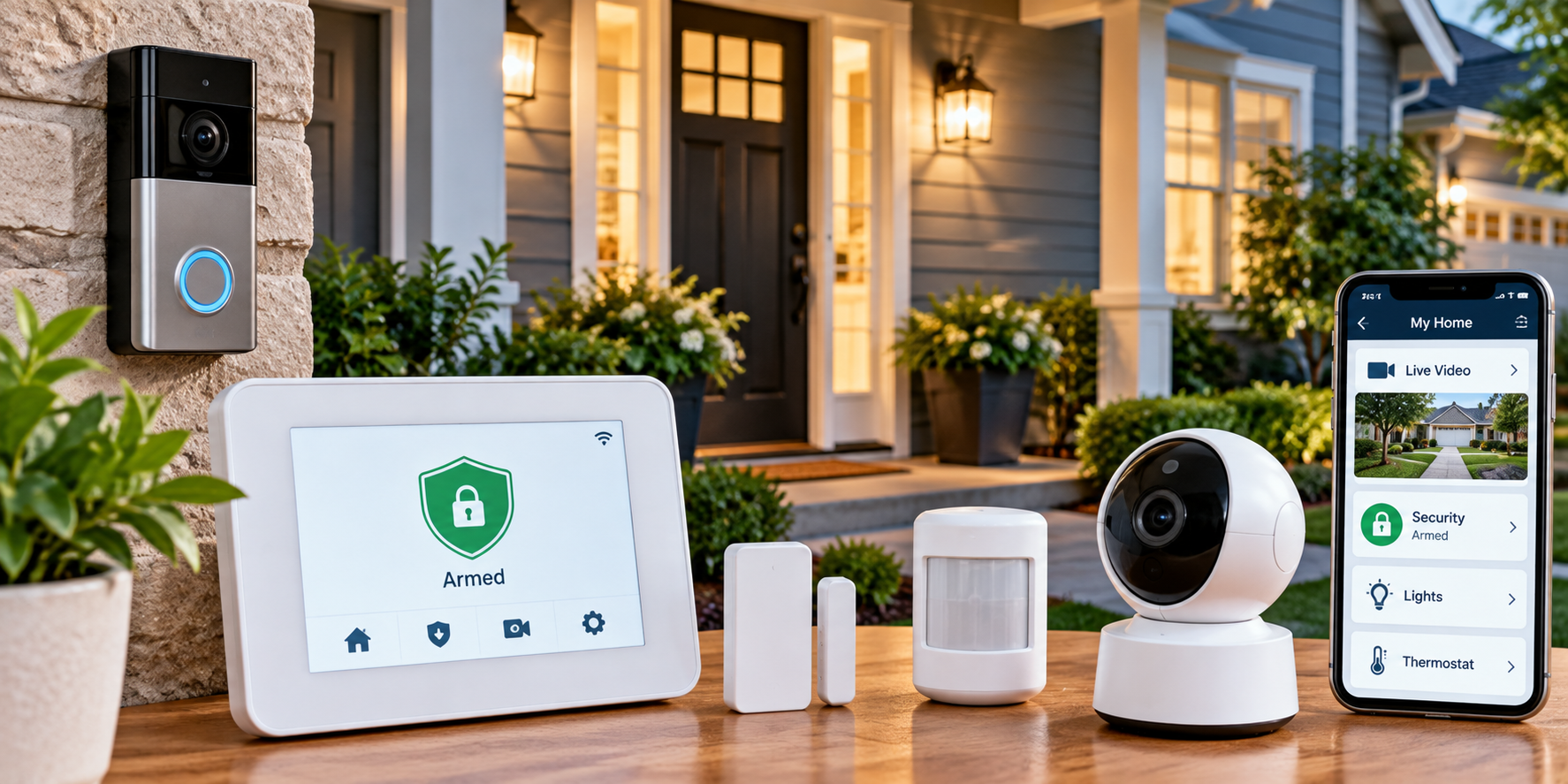
These days, you can monitor your front porch from your phone, receive alerts when a door opens, and check whether somebody is standing in your driveway.
You can also spend a small fortune on equipment, monitoring plans, cloud storage, and features you'll never use.
Which raises a perfectly reasonable question:
Do you really need a home security system—and if so, what kind?
The answer depends on your home, neighborhood, budget, and how much protection and convenience you want.
A security system can provide useful alerts, help deter some intruders, and make it easier to respond to potential problems.
But it isn't a substitute for good locks, sensible habits, or emergency preparedness.
Before signing a contract or filling your shopping cart with cameras, here's what you should know.
1. Understand What a Home Security System Actually Does
A typical home security system uses sensors and other devices to detect certain events around your property.
Depending on the equipment, it may alert you when:
- An exterior door opens.
- A window opens.
- Motion is detected.
- A security camera records activity.
- A glass-break sensor detects a sound consistent with breaking glass.
- A connected smoke or carbon monoxide alarm activates.
- Someone triggers a panic button.
Some systems sound an alarm. Others send notifications to your phone. Professionally monitored systems may also contact a monitoring center. But no system can guarantee that a burglary or emergency won't happen.
Think of security equipment as one layer of protection—not an invisible force field around your house.
2. Decide What You Want to Protect
Before comparing systems, think about your biggest concerns. Are you primarily interested in:
- Detecting unauthorized entry?
- Monitoring doors and windows?
- Receiving alerts while you're away?
- Watching package deliveries?
- Securing a detached garage?
- Monitoring a vacation property?
- Adding emergency alerts?
- Making your home feel more secure at night?
Your answers will help determine which equipment is worth buying. A small apartment may need only a few sensors.
A larger house with several entrances may benefit from a more extensive setup. You don't need every feature simply because it's available.
3. Learn the Difference Between DIY and Professional Installation
Most residential systems fall into two broad categories.
DIY Home Security Systems
These are designed for homeowners or renters to install themselves. They often include wireless sensors, an app, and optional monitoring.
Advantages may include:
- Lower installation costs
- Flexible equipment placement
- Easier expansion
- Potentially simpler removal when moving
However, you're responsible for setup, testing, troubleshooting, and ensuring the equipment works properly.
Professionally Installed Systems
A technician installs and configures the equipment. These systems may be useful for larger properties, complex layouts, or people who prefer professional assistance.
Installation fees, contracts, and service requirements vary. Neither approach is automatically better. Choose based on the property, your comfort with technology, and the total cost.
4. Understand Self-Monitoring vs. Professional Monitoring
This is one of the most important decisions.
Self-monitoring means the system sends alerts to you, usually through a smartphone app.
You're responsible for checking notifications and deciding what action to take.
Professional monitoring means a monitoring center receives qualifying alarm signals and follows established procedures, which may include contacting you or requesting emergency assistance.
Professional monitoring can be useful when you're asleep, traveling, or unable to check your phone.
However, monitoring services have limitations, and emergency response isn't guaranteed.
Ask exactly what events are monitored, how alarms are verified, and what happens when an alert is triggered.
5. Consider the Total Cost, Not Just the Equipment Price
A security system advertised at an attractive price may have additional expenses.
Look for:
- Equipment costs
- Installation fees
- Monthly monitoring charges
- Cloud video storage fees
- Cellular backup charges
- Optional service packages
- Replacement batteries
- Cancellation fees
- Contract commitments
Calculate the total cost over several years.
For example, a $25 monthly subscription costs $300 annually, or $900 over three years, before equipment and other charges.
That doesn't mean a monitoring plan isn't worthwhile. It means you should know what you're paying for.
6. Start With Door and Window Sensors
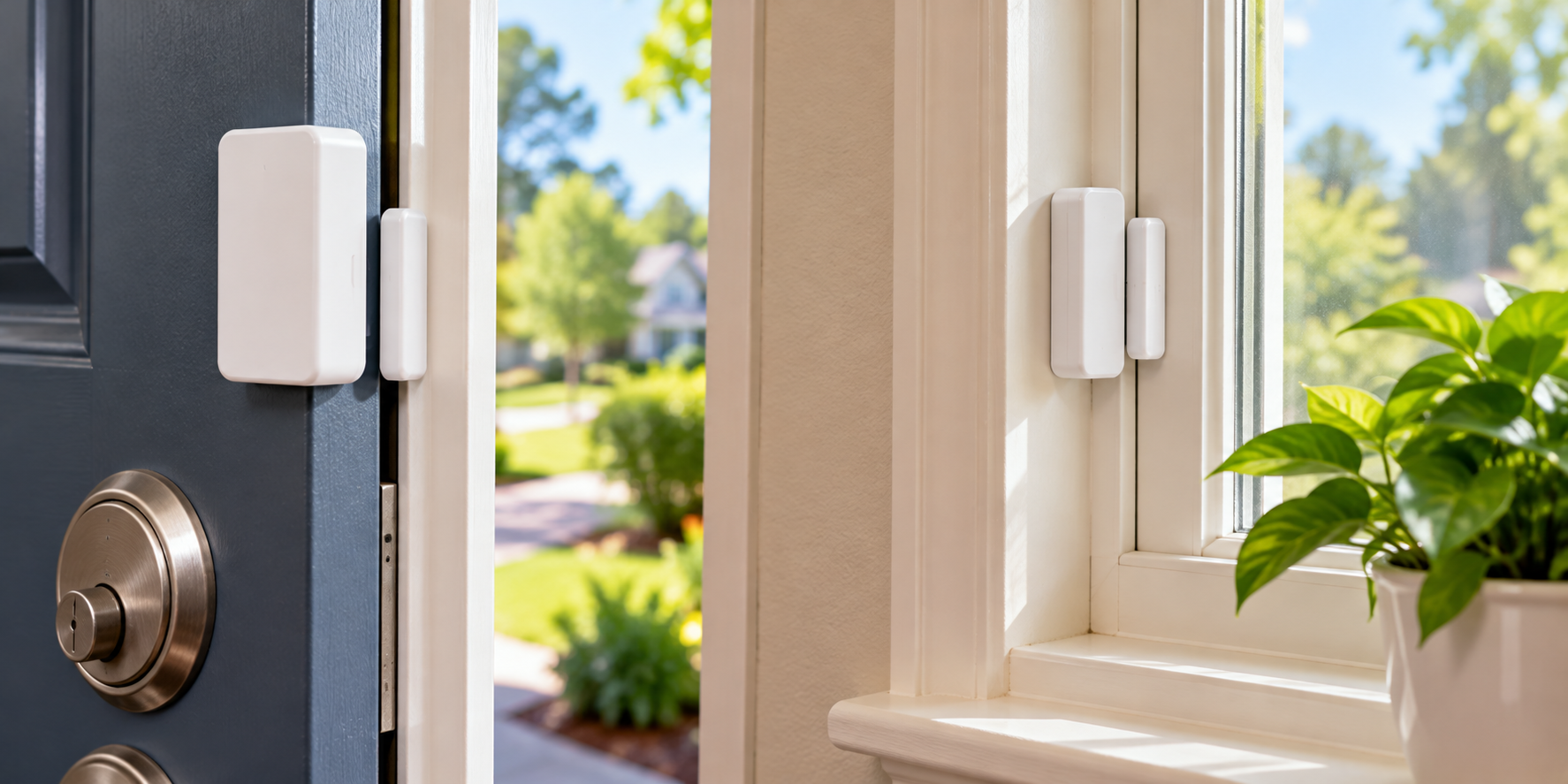
Entry sensors are common components of home security systems. They typically detect when a protected door or window opens.
Useful locations may include:
- Front doors
- Back doors
- Patio doors
- Accessible ground-floor windows
- Doors connecting the house to an attached garage
Consider your home's layout and how the system operates when you're home versus away. Follow the manufacturer's installation instructions. And remember that an entry sensor detects an event; it doesn't physically strengthen the door.
Good locks and sturdy hardware still matter.
7. Decide Whether You Need Motion Sensors
Motion sensors can help detect movement inside protected areas. They're often placed in hallways, living areas, or other locations someone might pass through after entering.
However, placement matters. Pets, heating equipment, sunlight, and other environmental factors may contribute to false alarms, depending on the sensor.
Look for equipment suitable for your household. If you have pets, ask how the system handles animal movement.
A motion detector that announces an emergency every time the cat walks through the living room will lose its charm quickly
8. Think Carefully About Security Cameras
Security cameras can provide useful visibility around your home. Common options include:
- Video doorbells
- Outdoor cameras
- Indoor cameras
- Floodlight cameras
- Cameras with local or cloud recording
Before buying, consider:
- Where the camera will be installed
- Image quality
- Nighttime performance
- Recording options
- Power requirements
- Internet dependence
- Privacy settings
- Subscription fees
Cameras can help you see what's happening. But they don't necessarily prevent an incident or ensure someone responds. And more cameras aren't automatically better.
The goal is useful coverage—not filming every square foot of your house.
9. Check Your Internet Requirements
Many modern security systems rely on home internet service for remote access, notifications, and video. Some also use cellular connections.
Ask what happens when:
- Your internet goes down
- Your router stops working
- Your phone loses service
- The system loses power
- A cloud service becomes unavailable
Certain systems can continue local alarm functions during an internet outage, while remote features may stop working. Others depend more heavily on connectivity.
Understand those differences before buying. A system that works beautifully under ideal conditions is only part of the story.
10. Look for Battery and Cellular Backup
Power outages happen. So do internet outages. Some home security systems offer backup batteries and cellular communication to maintain certain functions when normal service is interrupted.
Check:
- Whether backup power is included
- How long it is designed to last
- Which functions remain available
- Whether cellular backup costs extra
- How replacement batteries are handled
Don't assume every camera, sensor, or smart-home feature will continue working during an outage. Read the specifications.
Backup features are only useful when you understand what they're actually backing up.
11. Decide Whether Smart-Home Integration Matters
Some security systems work with compatible smart locks, lights, thermostats, and other devices. You may be able to create routines such as:
- Turning on exterior lights when motion is detected
- Locking compatible doors at bedtime
- Receiving notifications when certain doors open
- Controlling selected devices remotely
These features can be convenient. But compatibility varies by manufacturer, product, and service plan. Check whether your existing devices will work with the system.
And don't buy a collection of new smart-home gadgets unless they solve a problem you actually have.
Your refrigerator doesn't need to participate in neighborhood security.
12. Don't Forget About Privacy and Cybersecurity
Connected security equipment can collect sensitive information about your home and daily routines. Before choosing a system, review its privacy and security practices.
Look for:
- Multifactor authentication
- Strong account security
- Regular software updates
- Clear video storage policies
- Options to control recording and sharing
- Appropriate access permissions
- A process for removing former users
Use unique, strong passwords. Keep device firmware and apps updated. Avoid sharing account credentials unnecessarily.
For cameras, think carefully about what they record, particularly inside bedrooms, bathrooms, or other private spaces.
A system intended to improve security shouldn't create avoidable privacy problems.
13. Choose Camera Locations Thoughtfully
Camera placement should reflect your actual needs. Common areas to consider include:
- Front entrances
- Driveways
- Side entrances
- Backyards
- Detached structures
Avoid positioning cameras where they unnecessarily intrude on neighbors' private spaces. Check applicable local laws, homeowners association rules, and restrictions on audio recording.
Secure outdoor cameras against weather and tampering. And make sure cameras don't interfere with exits, doors, or other safety equipment.
A useful camera provides meaningful coverage. It doesn't need to record your neighbor's entire patio.
14. Make Sure the System Is Easy to Use
A security system shouldn't require a technical support call every time you leave the house. Look for straightforward controls.
Consider whether household members can:
- Arm and disarm the system
- Recognize important alerts
- Use emergency features
- Understand different security modes
- Manage notifications appropriately
If children, older adults, or frequent guests need access, plan accordingly. Choose controls that fit your household's abilities and routines.
Complicated systems often lead to shortcuts. And a security system that's constantly left disarmed isn't providing the protection you expected.
15. Understand False Alarms
False alarms can happen when a sensor is triggered accidentally, equipment malfunctions, or someone enters without disarming the system.
Frequent false alarms are frustrating. They may also lead to fees or penalties in some communities. To reduce them:
- Install sensors correctly.
- Keep equipment maintained.
- Train household members.
- Update access codes when necessary.
- Check for environmental triggers.
- Test equipment according to instructions.
Ask your monitoring provider how alarms are verified. Also check whether your city requires alarm registration or permits.
The goal is a system that gets your attention when something matters. Not one that panics because someone forgot the grocery bags.
16. Read the Contract Before Signing
If you're considering a professionally monitored system, review the agreement carefully.
Pay attention to:
- Contract length
- Automatic renewal terms
- Monthly price increases
- Equipment ownership
- Installation charges
- Service cancellation rules
- Early termination fees
- Moving policies
- Warranty coverage
Ask whether monitoring is optional. Find out whether the equipment remains usable if you cancel the service. Don't rely entirely on verbal promises.
A security contract should provide peace of mind. Not a new source of anxiety every time the bill arrives.
17. Consider Your Needs as a Renter
Renters may have different requirements from homeowners. A wireless, removable system may be more practical than equipment requiring permanent installation.
Before installing anything, review your lease and obtain any required permission.
Consider:
- Adhesive-mounted sensors
- Portable indoor equipment
- Compatible video doorbells
- Removable security devices
- Systems that can move with you
Avoid drilling into doors, walls, or shared building areas without authorization. Also check building rules and privacy considerations before installing cameras.
Renting doesn't mean you have to ignore home security. It means choosing solutions appropriate for the property.
18. Keep Traditional Home Security Basics in Place
Electronic security equipment is useful, but simple physical precautions still matter.
Make sure you have:
- Functional exterior door locks
- Secure window latches
- Appropriate exterior lighting
- Clear visibility around entrances
- Well-maintained doors and frames
- Safe, accessible exits
Avoid leaving spare keys in obvious outdoor hiding places. Don't advertise extended absences unnecessarily. And never modify doors or windows in ways that could prevent safe emergency escape.
A smart camera can notify you that somebody opened the back door. A properly secured door may help prevent that entry in the first place. Both serve different purposes.
19. Test and Maintain the System
Even a well-designed security system needs occasional attention. Follow the manufacturer's recommendations for:
- Testing sensors
- Checking battery status
- Updating software
- Cleaning camera lenses
- Inspecting outdoor equipment
- Verifying monitoring connections
- Reviewing account access
Coordinate alarm tests with your monitoring provider when necessary to avoid accidental emergency dispatch.
Check the system after major internet or electrical changes. And review it when household routines change.
A sensor installed five years ago may not be in the best location after you've rearranged the furniture.
20. Choose the System You'll Actually Use
The best home security system isn't necessarily the most expensive one. It's the one that fits your property, budget, and daily routine.
Before making a decision, ask yourself:
- What problems am I trying to solve?
- Which entrances need protection?
- Do I want professional monitoring?
- How much am I comfortable spending monthly?
- Do I need cameras?
- Will the system work during outages?
- Can everyone in the household use it?
- Am I comfortable with its privacy policies?
Start with the features that matter most. Add equipment later if needed.
You don't have to transform your home into a high-tech command center to improve security.
Home Security System Buying Checklist
Before purchasing, work through this list.
Your Home
- Identify doors and windows needing protection.
- Consider your home's layout.
- Check existing locks and lighting.
- Decide whether cameras would be useful.
- Review renter or homeowners association restrictions.
Equipment
- Compare entry sensors.
- Consider motion detectors.
- Check camera recording options.
- Review backup battery features.
- Ask about cellular connectivity.
- Confirm compatibility with existing devices.
Service and Costs
- Decide between self-monitoring and professional monitoring.
- Compare equipment prices.
- Review monthly charges.
- Check cloud storage fees.
- Read contract terms.
- Understand cancellation policies.
- Ask about local alarm permits.
Privacy and Maintenance
- Enable multifactor authentication if available.
- Review video and data privacy settings.
- Check software update policies.
- Understand how to test the system.
- Train household members.
- Schedule regular equipment checks.
Frequently Asked Questions About Home Security Systems
Are Home Security Systems Worth It?
They can be worthwhile when they address specific security concerns and fit your budget. Their value depends on the equipment, installation, monitoring arrangements, and how consistently they're used. No system guarantees protection from burglary or other emergencies.
Can You Install a Home Security System Yourself?
Many wireless systems are designed for DIY installation. More complex equipment may require professional installation. Follow manufacturer instructions and use qualified professionals for electrical work or other installations beyond your abilities.
Do Home Security Systems Work Without Wi-Fi?
Some systems retain certain local alarm functions without Wi-Fi, while others depend on internet connectivity. Cellular backup may preserve selected communication features. Check the exact product specifications.
Do Security Cameras Work Without a Subscription?
Some cameras offer local recording or limited free features, while others require subscriptions for video history, advanced alerts, or cloud storage. Compare features before purchasing.
Can Renters Use Home Security Systems?
Yes. Many wireless systems are suitable for renters, subject to lease terms, building rules, and installation restrictions.
Will a Home Security System Lower Homeowners Insurance?
Some insurers offer discounts for qualifying security or monitored alarm systems. Eligibility and savings vary. Ask your insurance company before assuming you'll receive a discount.
Do Home Security Systems Prevent Break-Ins?
Security systems may deter some intruders and provide alerts or recordings, but they cannot guarantee prevention. Physical security, lighting, sensible routines, and other precautions remain important.
The Bottom Line: Choose Protection, Not Just Technology
Home security systems have come a long way from the days of a keypad by the front door and an alarm that startled the entire neighborhood.
Today's options range from a few wireless sensors to professionally monitored systems with cameras, backup communication, and smart-home features.
But more equipment doesn't automatically mean better protection.
Start with your home's actual needs.
Make sure doors and windows are secure.
Decide whether monitoring would be useful.
Compare the total cost.
And choose equipment that's reliable, manageable, and appropriate for your household.
You want a home security system that helps you feel more confident about your home.
Not one that requires its own instruction manual, monthly budget meeting, and dedicated technical support department.
Keep Going
Protect your home and family with these related guides:
- Four Steps to a Safe Home: Identify common hazards and improve household safety.
- Home Safety Tips: Practical ways to make your home safer.
- Home Maintenance Tips: Keep doors, windows, and household systems in good condition.
- Easy Money-Saving Ideas: Make smarter household spending decisions.
- Home Organization Tips: Keep important household information and supplies organized.
- Backyard Family Living: Create a more practical and family-friendly outdoor space.
- Clean Home
- Safe at Home
- About Home Security Systems